
Dialogs and sheets
An app stops to ask or tell the user something in a few ways: the system’s own dialogs for a message, a question or a file; a sheet with your own views over the window; a brief notice that goes by itself; and the system’s print dialog.
Messages and questions
Section titled “Messages and questions”alert shows a message in the system’s dialog, and confirm asks a
question. The program waits for the answer:
Button("Save") {    if let error = writeText(path: path, text: text) {        alert("Couldn't save", message: error.message, kind: .error)    }}
Button("Delete") { if confirm("Delete {selected.count} items?", message: "This can't be undone.", confirmLabel: "Delete") { deleteSelected() }}confirmgivestruefor the confirm button, andfalsefor Cancel (or Escape).kind:is.info(the default),.warningor.error: the dialog’s icon.buttonLabel:names an alert’s button;confirmLabel:andcancelLabel:a question’s.
Files and folders
Section titled “Files and folders”openFile and
saveFile ask for one file.
openFiles asks for several, and chooseFolder for a folder:
Button("Add pictures…") {    for path in openFiles(types: ["png", "jpg"]) {        pictures.append(path)    }}
Button("Export…") {    if let folder = chooseFolder(title: "Export to") {        export(to: folder)    }}
openFiles gives an empty list when the dialog is cancelled; chooseFolder
gives nil.
Sheets
Section titled “Sheets”.sheet(isPresented: bind Bool) { … } shows your own views in a card in the
middle of the window, while the Bool is true. The rest of the window is
dimmed, and can’t be clicked until the sheet closes: use it for what must
be answered before going on, like a form for a new document or the app’s
settings.
app Notes(width: 420, height: 320) {    state creating = false    state title = ""    state due = now()
VStack { Button("New note…") { creating = true } } .sheet(isPresented: creating) { VStack(spacing: 12, alignment: .leading) { Text("New note").font(size: 15, weight: .semibold) TextField("Title", text: title).autofocus() DatePicker(date: due) HStack { Spacer() Button("Cancel") { dismiss() } Button("Create") { addNote() dismiss() } } } .frame(width: 280) }}- A sheet is as large as its content: give the content a
.frame(width:). dismiss()closes the sheet (or popover) that’s on top, from anywhere: a button’s action, or a view of your own inside it. Setting the binding tofalsedoes the same.- Escape closes it too. A click outside it does nothing (unlike a popover, which a click outside closes).
- Popovers work inside a sheet (a
DatePicker’s calendar, aFontPicker’s list), and a sheet can show another. - Put
.sheeton any view of the window; where doesn’t matter.
Asking for a text
Section titled “Asking for a text”TextPrompt is a sheet’s content for the common case of asking for one
text, like a new name:
Button("Rename…") { renaming = true } .sheet(isPresented: renaming) { TextPrompt("Rename", text: name, message: "The file's new name.") { saveName() } }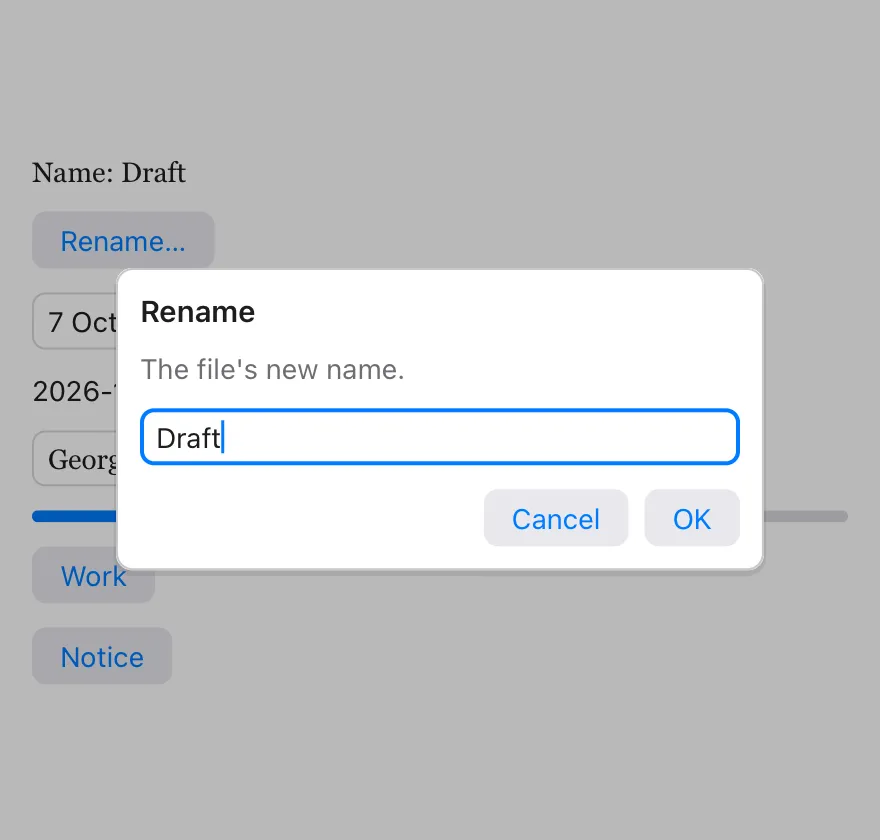
OK (or Enter) puts what was typed in text, closes the sheet and runs the
block. Cancel (or Escape) closes it and leaves text as it was. See
TextPrompt.
Showing progress
Section titled “Showing progress”ProgressPanel is a sheet’s content for work that takes a while: a title, a
ProgressBar, a note and a Cancel button.
With a background job that reports its progress:
state exporting = falsestate done = 0.0state note = ""state job: BackgroundJob? = nil
Button("Export") {    exporting = true    job = background(work: { job in exportAll(job: job) }, progress: { fraction, text in        done = fraction        note = text    }) { count in        exporting = false    }}.sheet(isPresented: exporting) {    ProgressPanel("Exporting…", value: done, note: note, onCancel: {        job?.cancel()        exporting = false    })}
A ProgressBar by itself goes anywhere: ProgressBar(value: done).
Notices
Section titled “Notices”showNotice("Saved") shows a short message near the bottom of the window,
which goes by itself after a moment. It doesn’t stop the user: use it to
say that something was done.
Button("Copy link") { copyToClipboard(link) showNotice("Link copied")}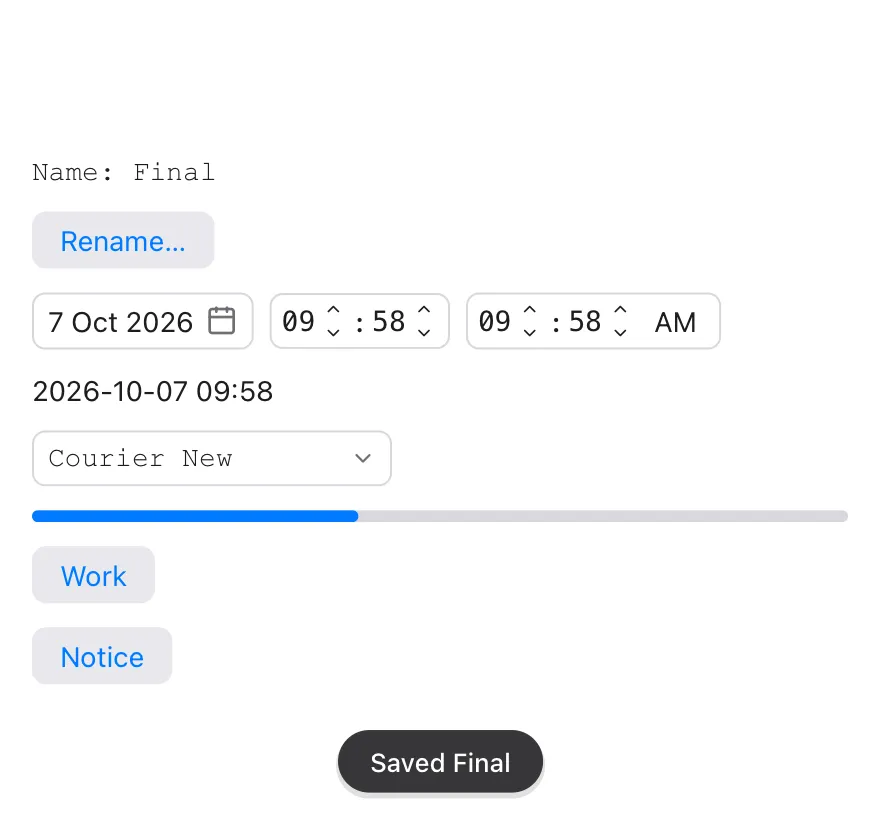
A notice shows for 2.5 seconds, or for seconds:. A new one takes the place
of the one that shows.
Printing
Section titled “Printing”printDocument draws pages the way
writePDF does, and prints them:
Button("Print…") { printDocument(title: "Invoice 42") { g in g.text("Invoice 42", x: 50, y: 50, size: 24, weight: .bold) drawLines(g) g.newPage() drawTerms(g) }}- On macOS, the system’s print dialog opens for the document, with its
preview, the printers and “Save as PDF”.
printDocumentgivesfalsewhen it’s cancelled. - On Windows, the document is handed to the app that opens PDF files, to print it; if that app can’t be asked to print, the document opens in it, to be printed from there.
width:andheight:are the page’s size in points, A4 unless given, as forwritePDF.
In test scripts
Section titled “In test scripts”In a headless test run no system dialog opens. Alerts,
questions and print requests are printed, like Confirm "Delete 3 items?" [Cancel] [Delete], and the script’s answer command decides how the next
dialog ends:
| Command | |
|---|---|
answer ok | The next confirm is confirmed. (With no answer waiting, it’s cancelled.) |
answer cancel | The next dialog is cancelled. |
answer "/tmp/out" | The next chooseFolder (or openFile, saveFile) gives this path. |
answer "a.png|b.png" | The next openFiles gives these paths. |
A sheet shows as Sheet at the end of tree, and a notice as Notice "Saved"; wait 3 lets a notice’s time pass.